


The short answer
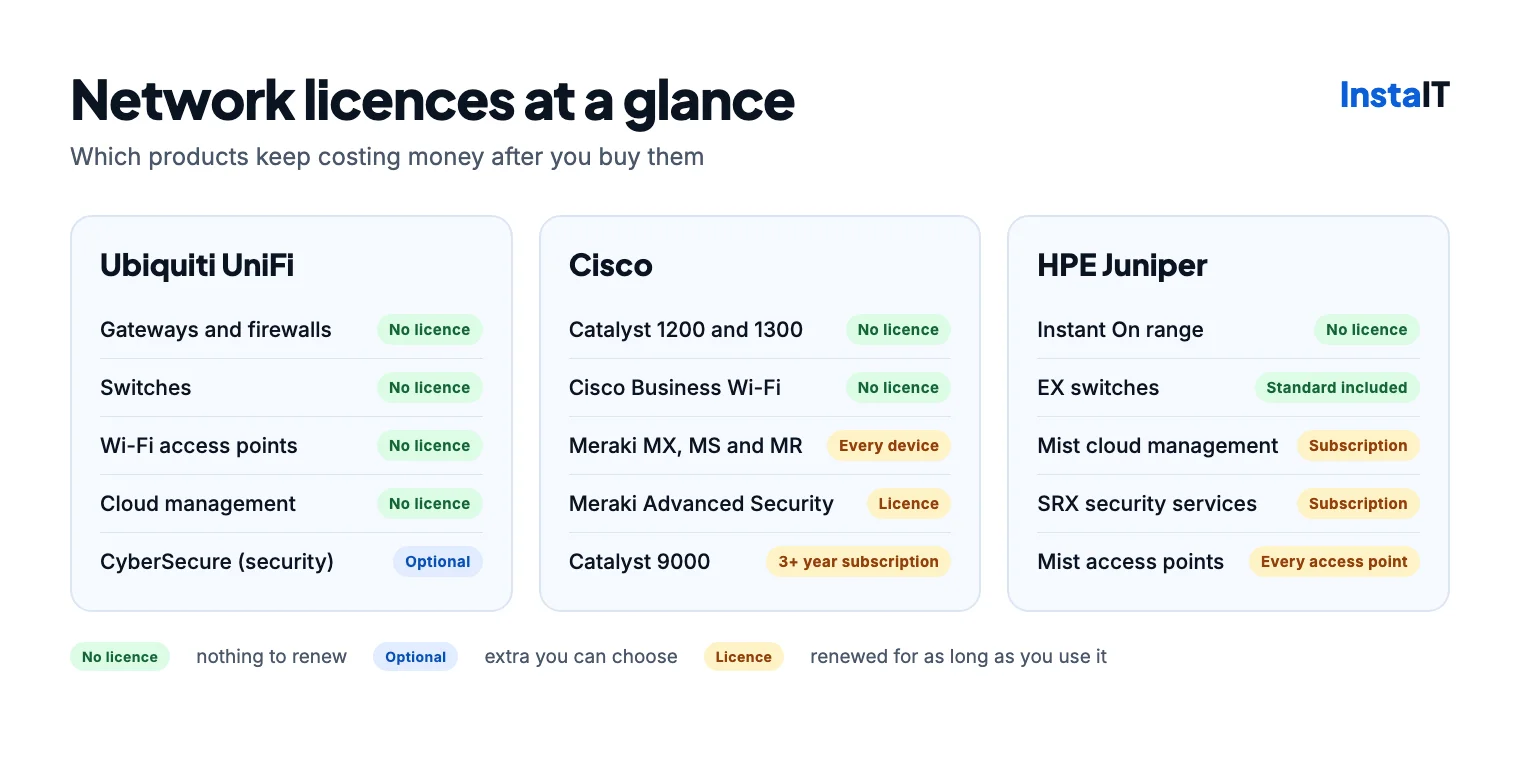
If you want to buy your network equipment once and never pay a licence, there are three good options: Ubiquiti UniFi, HPE Networking Instant On and Cisco’s small-business range (Catalyst 1200 and 1300 switches and Cisco Business access points).
If you want manufacturer support contracts, cloud management with AI-assisted troubleshooting and room to grow into a large network, Cisco Meraki, Cisco Catalyst and HPE Juniper Mist are strong choices. But most of their products need a licence or subscription that you renew for as long as you use them.
Our team holds Cisco and Juniper certifications, and we install Cisco, Juniper and Ubiquiti networks, so this guide isn’t written to sell one brand. Licence terms and prices change, so check them when you buy.
What a licence pays for
A licence on network equipment usually pays for one or more of these:
- Cloud management: the dashboard where you set up and monitor the network.
- Security services: intrusion prevention, web filtering and anti-malware updates on the firewall.
- Support and software updates from the manufacturer.
- Extra features, such as advanced routing or network analytics.
Licences aren’t bad in themselves: they fund support, security updates and new features. The questions to ask are whether the equipment keeps working if you stop paying, and what the renewal costs in years two to five, not just in the first year.
Ubiquiti UniFi
Ubiquiti’s website now leads with “License Free” and the line “No licenses. No subscriptions. Just ownership.” For UniFi gateways, switches and access points, that holds up: you buy the hardware, and the UniFi software, cloud management and software updates come with it at no extra cost.
- Gateways (firewall and router): the Cloud Gateway Ultra and Cloud Gateway Max for small offices, the Cloud Gateway Fiber and Dream Machine Pro Max for larger sites, and the Enterprise Firewall at the top end.
- Switches: from the 5-port Flex Mini and the Switch Lite 8 PoE up to the Pro Max and Enterprise Campus ranges.
- Wi‑Fi 7 access points: the U7 Lite, U7 Pro and U7 Pro Max.
There are optional paid extras. CyberSecure adds threat signatures from Proofpoint and content filtering from Cloudflare to UniFi gateways, for about €100 a year per site at reseller prices. UI Care extends the hardware warranty, and Ubiquiti sells priority phone support. None of these is needed to keep the network running.
The trade-off is support. Ubiquiti’s standard support is mainly online, while Cisco and Juniper sell support contracts with guaranteed response and hardware replacement times. For most small offices UniFi’s approach is fine, especially with a local IT partner and a spare switch or access point on the shelf.
Cisco
Cisco sells three quite different ranges to smaller businesses, and only one of them is licence-free.
No licence: Catalyst 1200 and 1300 switches and Cisco Business access points
For its Catalyst 1200 and 1300 switches, Cisco says “there is no license to purchase, and software updates are available at no additional cost.” They replace the older Cisco Business 250 and 350 switches. Cisco Business access points are also managed without a licence, but check the model is still on sale: Cisco stopped selling the Cisco Business 140AC in August 2026 and hasn’t named a replacement.
A licence on every device: Cisco Meraki
Meraki MX firewalls, MS switches and MR access points are managed from Cisco’s Meraki cloud dashboard, and every Meraki device needs a licence. Licences are bought for a set term, from one year up to seven or ten depending on the licensing model, and longer terms usually cost less per year. They include Cisco’s support and software updates for the term.
Meraki firewalls have two main licence levels: Enterprise, and Advanced Security, which adds intrusion prevention, content filtering and anti-malware. Meraki is easy to manage and very reliable, which is why many larger businesses use it. The catch is that the licence isn’t optional, so the yearly cost continues for the life of the equipment.
A subscription at purchase: Catalyst 9000
Cisco’s Catalyst 9200 and 9300 switches and Catalyst access points are built for medium and larger networks. They’re normally sold with a permanent base licence plus a Cisco software subscription of at least three years. When the subscription ends, the switch keeps working on its base features, but the extra management and analytics features stop unless you renew. Some Catalyst 9200 and 9300 models can instead be managed in the Meraki dashboard, with a Meraki licence.
HPE Juniper and Instant On
Juniper became part of HPE in 2025, and its cloud platform is now sold as HPE Mist. HPE also sells a separate licence-free range for small sites, HPE Networking Instant On (formerly Aruba Instant On).
A subscription for every access point: Mist
Mist access points are managed from the Mist cloud, and HPE’s documentation says the Wi‑Fi Assurance subscription is mandatory when you use its access points. You need one subscription for each access point, for one, three or five years. Optional add-ons include the Marvis AI assistant, which helps find and fix Wi‑Fi and network problems.
Licence included, cloud by subscription: EX switches
Juniper EX switches, such as the EX2300 and EX4100, include a Standard licence with the hardware, which covers everyday Layer 2 and Layer 3 switching. Advanced and Premium licences add features such as OSPF and BGP routing. The switches can run on their own without any subscription, but managing them from the Mist cloud needs a Wired Assurance subscription.
Security by subscription: SRX firewalls
Juniper SRX firewalls, such as the SRX300 range, handle routing, firewalling and VPNs. Security services such as intrusion prevention, web filtering and anti-malware are subscriptions, as is management from the Mist cloud.
No licence: HPE Networking Instant On
For smaller sites, HPE’s Instant On access points, 1830, 1930 and 1960 switches, and SG1004 and SG2505P gateways are sold with no subscription or licence fees. Everything is managed from a free phone app or web portal, and the gateways include a firewall, intrusion prevention and VPN.
Side by side, by business size
These are typical setups for each size of business, with the licence each one needs. Most offices also need cabling, a comms cabinet and a Wi‑Fi survey, whichever brand they choose.
| Business size | Ubiquiti UniFi | Cisco | HPE Juniper and Instant On |
|---|---|---|---|
| Micro 1 to 9 people | Cloud Gateway Ultra, Switch Lite 8 PoE, U7 Lite or U7 Pro. No licence. | Catalyst 1200 switch and Cisco Business access points, with a Meraki MX firewall. Licence on the firewall only. | Instant On SG1004 gateway, 1830 switch and Instant On access points. No licence. |
| Small 10 to 49 people | Cloud Gateway Max or Dream Machine Pro Max, Pro Max 16 or 24 PoE switch, U7 Pro. No licence (CyberSecure optional). | Meraki MX firewall, MS switches and MR access points in one dashboard. Licence on every device. Or Catalyst 1300 switches, which need no licence. | SRX firewall, EX2300 or EX4100 switches, Mist access points. Subscription for every access point, plus cloud management and security services. Or Instant On 1960 switches and SG2505P gateway, with no licence. |
| Medium 50 to 249 people | Dream Machine Pro Max or Enterprise Firewall, Pro Max or Enterprise Campus switches, U7 Pro Max. No licence. | Meraki throughout (licence on every device), or Catalyst 9200 and 9300 switches with Catalyst access points. Subscription of three years or more at purchase. | Larger SRX firewalls, EX4100 switches, Mist access points with the Marvis AI assistant. Subscriptions for access points, cloud management and security. |
What the licences cost each year
Here’s the yearly licence cost for a typical small office: one firewall, one 8-port PoE switch and three Wi‑Fi access points. These are indicative European reseller prices from November 2026, rounded. Your price will depend on the reseller and the term, and multi-year licences usually cost less per year.
| Option | Licences needed | Yearly licence cost |
|---|---|---|
| Ubiquiti UniFi | None | €0 (optional CyberSecure: about €100) |
| HPE Networking Instant On | None | €0 |
| Cisco Catalyst 1200 or 1300 switch and Cisco Business access points | None for the switch and access points | €0 for these, plus whichever firewall you choose |
| Cisco Meraki, Enterprise licences | MX firewall, MS switch and three MR access points | About €500 to €700 |
| Cisco Meraki, Advanced Security on the firewall | As above | About €650 to €900 |
| HPE Juniper Mist | Wi‑Fi Assurance for each access point, plus cloud management and security services if used | Quoted by resellers: ask for the price of years 2 to 5 as well |
Over five years, Meraki licences for this small office come to roughly €2,500 to €4,500, on top of the hardware. That doesn’t make Meraki a bad choice: the licence includes Cisco’s support and updates, and for a business without in-house IT that can be worth paying for. But the cost should be part of the decision from the start.
Meraki figures used: an MX67 Enterprise licence at about €200 to €250 a year, MX67 Advanced Security at about €380 to €460, an 8-port MS switch licence at about €30 to €60, and an MR access point licence at about €85 to €120. Hardware prices aren’t included for any brand.
If a licence lapses
This is the part people often find out too late. Meraki’s default licensing model is co-termination, where all the licences in your account share one end date.
| Product | Licence needed? | If you stop paying |
|---|---|---|
| Ubiquiti UniFi | No | Nothing changes. Optional extras such as CyberSecure stop. |
| HPE Networking Instant On | No | Nothing changes. |
| Cisco Catalyst 1200 and 1300, Cisco Business access points | No | Nothing changes. |
| Cisco Meraki, co-termination licensing (the default) | Yes, every device | After a 30-day grace period, Cisco says the devices are shut down until licensing is back in order, so the network stops. |
| Cisco Meraki, subscription licensing | Yes, every device | After a 30-day grace period you can no longer change or manage the network from the dashboard, but traffic keeps flowing. |
| Cisco Catalyst 9000 | Subscription at purchase | Switching carries on with the base licence; the subscription features stop. |
| HPE Mist access points | Yes, every access point | Juniper’s licensing guide says you “may no longer use the features and scale granted under the expired subscription”. Ask your supplier what that means for your access points before you buy. |
| HPE Juniper EX switches | Standard licence included | Switching carries on; cloud management and extra features stop. |
| HPE Juniper SRX firewalls | For security services | The firewall and VPN carry on; security services need an active subscription. |
Which should you choose?
Licences are one factor. These matter just as much:
- Size and growth: UniFi and Instant On suit most micro and small offices well. With more than 50 people or several sites, the management, support and security features of Meraki, Catalyst or Mist start to earn their cost.
- Support: if downtime is expensive for you, a manufacturer support contract with guaranteed replacement times can matter more than the licence saving.
- Security: up-to-date intrusion prevention and web filtering are a paid extra on most platforms, including UniFi (CyberSecure), Meraki (Advanced Security) and Juniper SRX. Budget for them if you need them.
- Who looks after it: all of these have good dashboards. What matters is that someone keeps the firmware updated and acts on the alerts.
- One dashboard: mixing brands works, but a firewall, switches and Wi‑Fi managed in one place are easier to run.
For most Irish micro and small businesses, we’d start with UniFi or Instant On, use Cisco’s licence-free switches where they fit, and keep Meraki, Catalyst and Mist for sites where the support and features justify the yearly cost. Our guides to choosing business Wi‑Fi and upgrading a business network cover the rest of the planning.
NETWORK INSTALLATION IN CORK
Not sure which fits your office?
We design and install Cisco, Juniper and Ubiquiti networks, and our team holds Cisco and Juniper certifications. Tell us about your office and we’ll recommend a setup, with the licence costs shown up front. See our network and Wi‑Fi installation service.
Discuss your network