



Signs your network needs attention
Networks rarely fail all at once. These are the warning signs that show up most often in small and medium-sized offices:
- Slowdowns at busy times, even after upgrading the internet line.
- Wi‑Fi that drops out in meeting rooms, upstairs or at the far end of the building.
- Equipment that no longer gets firmware or security updates from the manufacturer.
- Consumer routers or unmanaged switches doing a business job.
- One flat network shared by staff, guests, cameras and phones.
- No spare switch ports or PoE power for new access points, phones or cameras.
- Nobody has the admin passwords, or nothing is documented.
- A move or expansion on the way.
One of these on its own may only need a configuration change. Several together usually mean the network has outgrown its original design.
Start with an assessment, not a shopping list
Before choosing equipment, find out what you have and what the business needs from it. A useful assessment covers:
- An inventory of the firewall, switches, access points and cabling, with model numbers and whether each is still supported by the manufacturer.
- How the network is used today: the number of users and devices, cloud applications, video calls, VoIP phones, CCTV and guest access.
- A Wi‑Fi survey of the premises, including walls, floors and areas where coverage is weak.
- Growth plans for the next three to five years, so the new design doesn't need replacing again next year.
Our guide to choosing business Wi‑Fi covers the wireless side in more detail.
What good network design looks like
A well-designed small-business network is built in layers, with each layer doing one job.
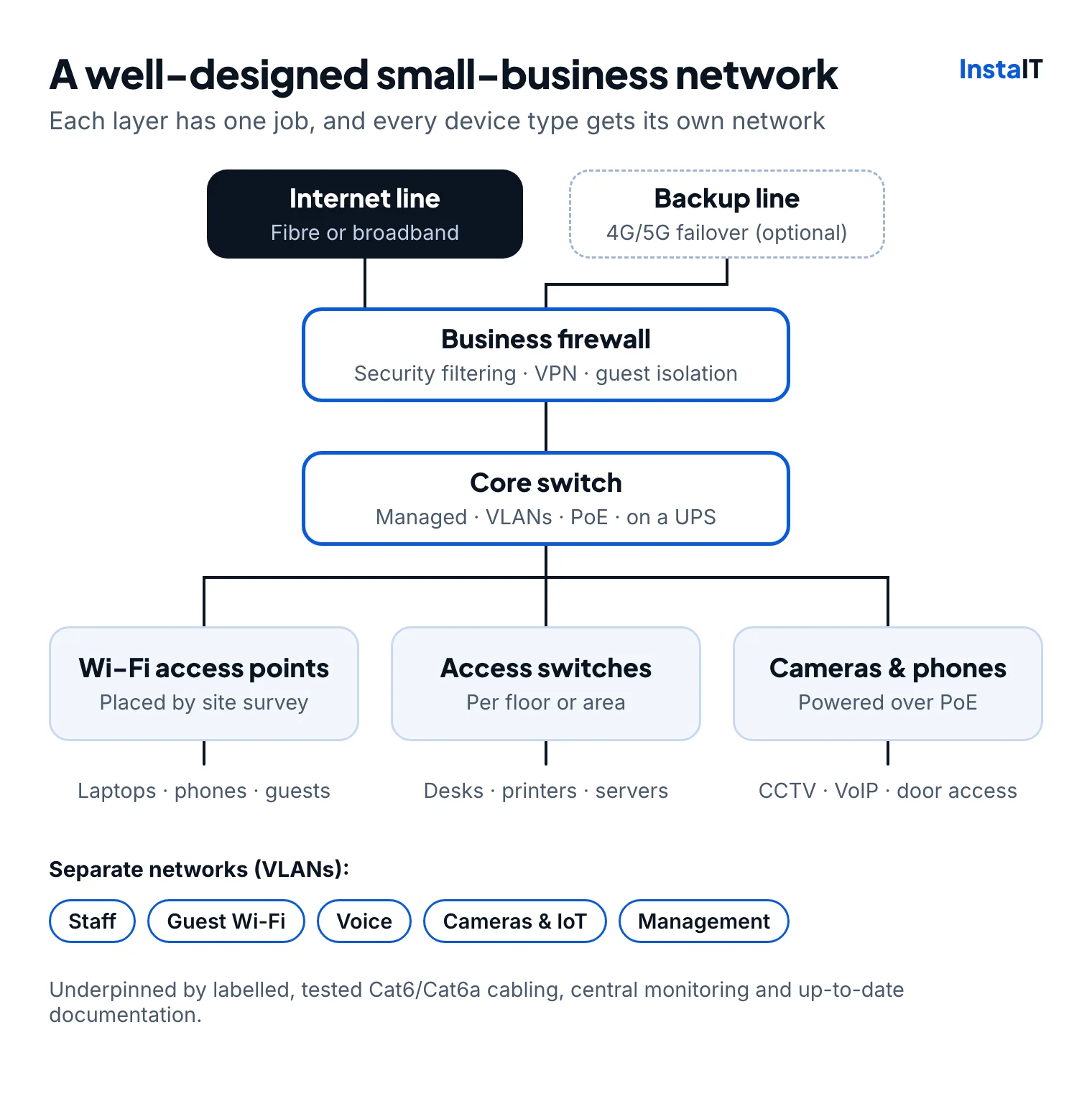
- A business firewall at the edge, with security filtering, secure remote access (VPN) and current security subscriptions.
- Managed switches with VLANs, so staff, guests, phones, cameras and other smart devices each sit on their own network segment.
- Enough Power over Ethernet (PoE) to run access points, phones and cameras from the switch, with headroom for growth.
- Wi‑Fi planned by survey, with access points placed for coverage and capacity rather than wherever there was a free socket.
- Structured cabling: Cat6 or Cat6a, labelled at both ends and tested.
- Resilience where it matters: a UPS for the core equipment and, if the business can't work offline, a 4G/5G backup internet line.
- Central management and monitoring, with configuration backups and up-to-date documentation, so problems are spotted early and anyone supporting the network knows how it is built.
Separating devices also matters for security, which is why our cybersecurity services often start with a review of the network itself.
Update, reconfigure or replace?
Not every problem needs new equipment. Firmware updates, better Wi‑Fi channel planning or adding VLANs to existing managed switches can fix a lot. Replacement makes sense when equipment no longer receives security updates, lacks features you need or can't handle the load.
| Problem | Often fixed by | Replace when |
|---|---|---|
| Slow or unreliable Wi‑Fi | Tuning channels and power, moving or adding access points | Access points are several generations old or no longer supported |
| Everything on one network | Adding VLANs on the managed switches and firewall | Switches are unmanaged and can't support VLANs |
| No ports or PoE for new devices | Adding a switch | Port count or PoE power is exhausted across the network |
| Security alerts or slow internet through the firewall | Firmware updates, a rule review, renewing security subscriptions | The firewall is end-of-life or can't handle your line speed with security features on |
How an upgrade project runs
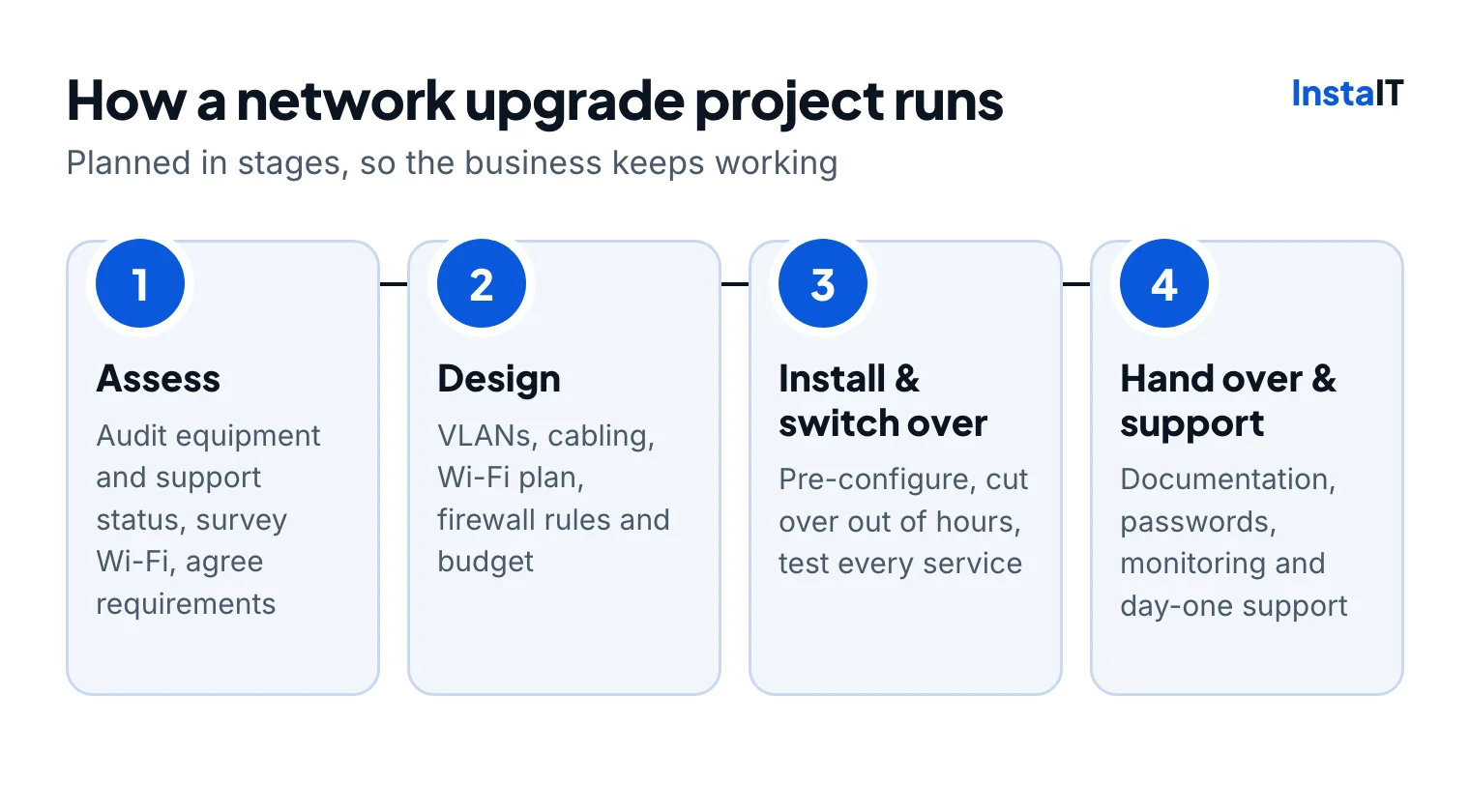
A well-run upgrade keeps the business working throughout:
- Assess the current network, its support status and the requirements.
- Design the new layout, including VLANs, cabling, the Wi‑Fi plan, firewall rules and budget, and agree it before anything is ordered.
- Install and switch over. Equipment is configured in advance and the cutover happens out of hours, with a way to roll back. Every service is then tested: internet, Wi‑Fi, printers, phones, VPN and cloud apps.
- Hand over and support. You receive documentation and admin credentials, monitoring is switched on, and support is on hand on the first working day.
If the upgrade is part of a move, it can be planned alongside it as part of an office IT relocation.
Choosing equipment
Cisco, Juniper (including Mist wireless) and Ubiquiti all make reliable business networking equipment. The right choice depends on the size of the site, the budget, how the network will be managed and how long the manufacturer will support the hardware. Ask about licensing too, as some platforms need ongoing subscriptions for cloud management or security features.
Equipment can be sourced through our IT procurement service, so design, supply and installation come from one place.
Network upgrades in Cork
InstaIT designs and installs business networks across Cork city and county. Every project starts with a site visit to see the building, the comms cabinet and how people actually work. Where needed, the work can be coordinated with your internet provider, landlord and electrical contractors, and disruptive work can be scheduled outside business hours.
NETWORK UPGRADES IN CORK
Planning a network upgrade?
See our network installation and Wi‑Fi services in Cork, or get in touch to arrange an assessment. InstaIT's team holds CompTIA, Cisco and Juniper certifications.
Discuss your network