


Check your site first. Our free SEO checker tests the 39 items marked “Our checker tests this” and tells you how to fix each problem. It usually takes under 30 seconds, and you can email yourself the report.
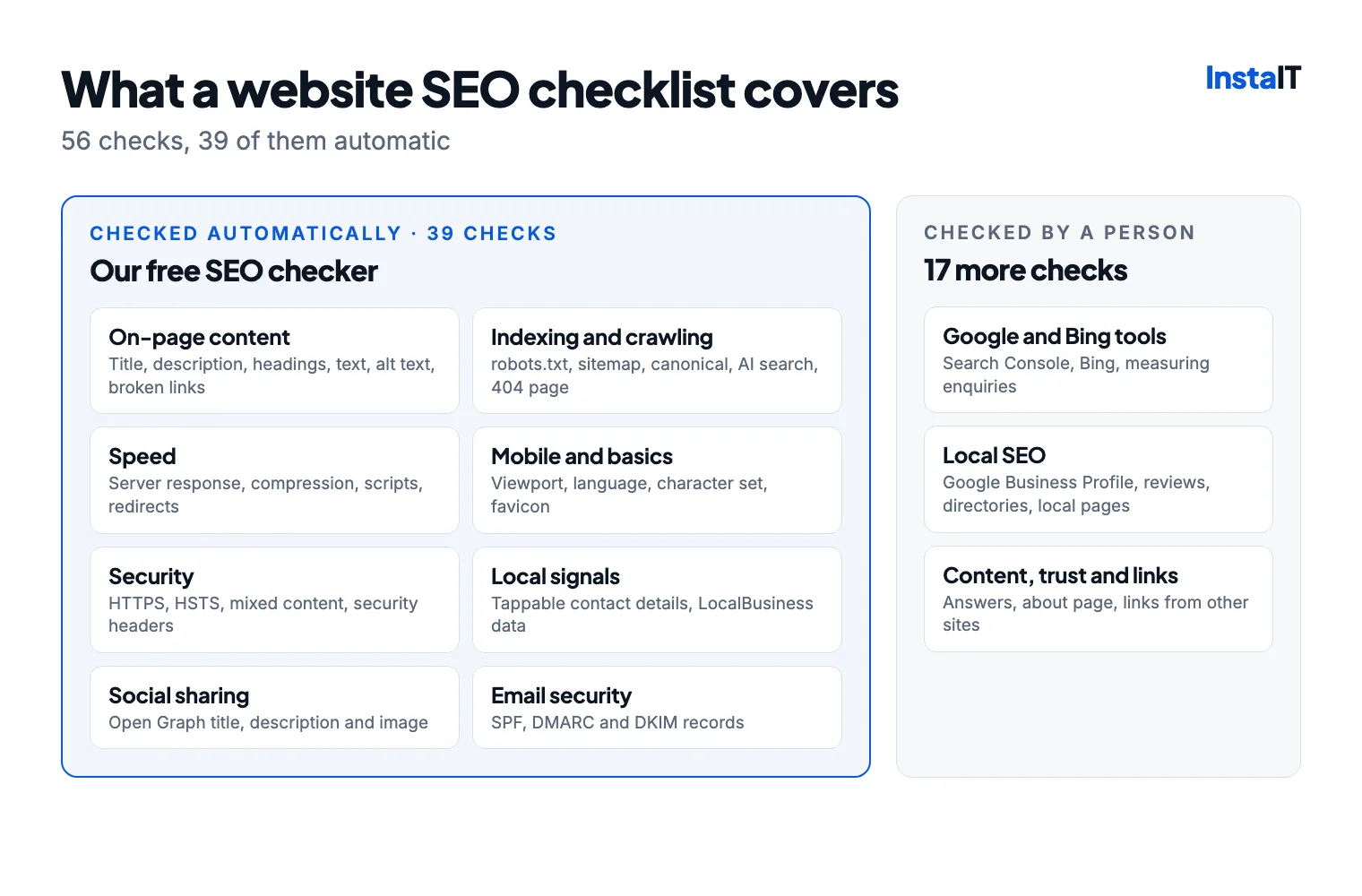
Start with the free Google and Bing tools
These show how search engines really see your site. Set them up first, because many of the later checks use them.
- Set up Google Search Console. It’s free and shows which searches you appear for, how many people click, which pages Google has indexed and any problems it has found. Verify your whole domain with a DNS record so every version of your address is included.
- Add your site to Bing Webmaster Tools. You can import everything from Search Console in a few clicks. Bing’s results also feed other services, including DuckDuckGo and Microsoft Copilot.
- Measure enquiries, not just visits. Use Google Analytics or a similar tool, and count form submissions, calls and email clicks as conversions, so you can see whether SEO is bringing in business. Ask for consent before setting analytics cookies.
On-page content
What each page says, and how it’s labelled for search engines.
- Our checker tests thisA unique page title of 30 to 60 characters. Put the main thing the page is about first and your business name last, for example “Office cleaning in Cork | Your Business”. Every page needs its own title. Longer titles get cut off in Google’s results.
- Our checker tests thisA meta description of 70 to 160 characters. Sum up the page and give people a reason to click: what you offer, where, and what makes you different. Google sometimes writes its own, but a good description is often used as it is.
- Our checker tests thisOne main heading (H1) per page. It should say what the page is about in the words your customers use, such as “Commercial cleaning in Cork”, not “Welcome” or your logo.
- Our checker tests thisSubheadings that break the page into sections. Use H2s for the main sections and H3s under those. Use headings for structure, not just to make text big.
- Our checker tests thisEnough text to explain what you do. Around 300 words or more is a sensible minimum for a main page. Give each service its own page, and write your own text rather than copying it from suppliers or other websites.
- Our checker tests thisAlt text on every meaningful image. Describe what the image shows, for example “Team cleaning a school corridor in Cork”. It helps people using screen readers and helps your images appear in Google Images. Decorative images should have an empty alt="".
- Our checker tests thisLinks between your own pages. Link your services, prices, areas and contact page to each other, with link text that says where the link goes (not “click here”). Every important page should be reachable within a few clicks of your home page.
- Our checker tests thisNo broken links. Fix links to pages that no longer exist, and permanently redirect (301) old addresses when you move or rename a page. Our checker tests the links on the page you check; Search Console’s Pages report lists the addresses Google can’t load across your whole site.
Indexing and crawling
Whether search engines can find, read and list your pages.
- Our checker tests thisNo “noindex” on pages you want in Google. A noindex tag keeps a page out of search results. It’s often left behind when a site goes live. In WordPress, make sure “Discourage search engines from indexing this site” under Settings → Reading is unticked.
- Our checker tests thisA robots.txt file that doesn’t block your site. It lives at yoursite.ie/robots.txt. “Disallow: /” blocks your whole site, and blocking your CSS or JavaScript files stops Google seeing your pages properly. robots.txt doesn’t hide private pages: use a password for those.
- Our checker tests thisAn XML sitemap, submitted to Google and Bing. List only the pages you want in search results. Most website builders and SEO plugins create one. Add a “Sitemap:” line to robots.txt and submit it in Search Console and Bing Webmaster Tools.
- Our checker tests thisA canonical tag on every page. It tells search engines which address is the main one when a page can be reached in more than one way, for example with tracking codes added. On a normal page it should point to the page’s own address.
- Our checker tests thisOne version of your address. yoursite.ie and www.yoursite.ie should both work, with one permanently redirecting (301) to the other. Otherwise Google may see two copies of your site.
- Our checker tests thisStructured data describing your business. Add schema.org JSON-LD with your business name, logo, service area or address, opening hours and links to your Google Business Profile and social pages, using a type such as LocalBusiness or Organization. It must match what’s on the page. Test it with Google’s Rich Results Test.
- Our checker tests thisAI search tools allowed in. More people now ask ChatGPT, Claude and Perplexity for recommendations. Make sure robots.txt doesn’t block their search crawlers: OAI-SearchBot, ChatGPT-User, Claude-SearchBot and PerplexityBot. Blocking the crawlers that only collect training data, such as GPTBot, doesn’t affect search.
- Our checker tests thisA helpful 404 page. Pages that don’t exist should return a 404 status, with a page that links back to your home page, services and contact page. Returning “200 OK”, or redirecting every missing page to the home page, creates “soft 404s” that Google reports in Search Console.
Speed
Slow pages lose visitors, and Google uses real-world speed as a ranking signal.
- Our checker tests thisA server that responds in under a second. Slow first responses usually mean slow hosting, no page caching or a heavy plugin. Turn on caching, consider a CDN such as Cloudflare, or move to better hosting. Our guide to choosing web hosting explains what to look for.
- Our checker tests thisA lean page. Page builders, long lists and images embedded in the code can make the HTML itself very large. Remove sections and plugins you don’t use.
- Our checker tests thisCompression switched on. gzip or Brotli compression makes pages download several times faster. It’s usually one setting on your server or CDN.
- Our checker tests thisOnly the scripts and stylesheets you need. Every plugin tends to add its own files. Remove the ones you don’t use, and combine or defer the rest with a caching plugin.
- Our checker tests thisScripts that don’t hold the page up. Scripts in the page’s <head> should use defer or async, so the page can appear before they download. Many caching plugins can do this for you. Test the site afterwards.
- Our checker tests thisRedirects in one step. An old address should go straight to the final page (https, with or without www), not through a chain of redirects. Update your own links to point at final addresses.
- Our checker tests thisHTTP/2 or HTTP/3. Newer versions of HTTP load many files at once. Most hosts and CDNs support them with one setting.
- Good Core Web Vitals on phones. Run your main pages through PageSpeed Insights. Google’s targets are Largest Contentful Paint under 2.5 seconds, Interaction to Next Paint under 200 milliseconds and Cumulative Layout Shift under 0.1. Search Console reports them for your whole site.
- Images sized and compressed. Resize photos to the size they’re shown, use WebP or AVIF, give them a width and height so the page doesn’t jump while loading, and lazy-load images further down the page.
Mobile and basics
Most local searches happen on phones, and Google ranks pages by their mobile version.
- Our checker tests thisA mobile viewport tag. Without <meta name="viewport" content="width=device-width, initial-scale=1">, phones show a shrunken desktop page. Don’t stop people zooming in.
- A site that’s easy to use on a phone. Test it on a real phone: text should be readable without zooming, buttons easy to tap, phone numbers and email addresses tappable, and no pop-ups covering the content.
- Our checker tests thisThe page language set. Add it to the opening tag, for example <html lang="en-IE">. Screen readers and translation tools use it.
- Our checker tests thisA character set declared. <meta charset="utf-8"> at the top of the page makes sure accents and symbols such as € display correctly.
- Our checker tests thisA favicon. Google shows it next to your site in search results. Use a square image of at least 48 by 48 pixels, usually your logo.
Security
Browsers warn visitors about insecure sites, and Google flags hacked ones in its results.
- Our checker tests thisHTTPS with a valid certificate. Free Let’s Encrypt certificates are available from almost every host. Make sure the certificate renews automatically.
- Our checker tests thishttp:// redirecting to https://. Every http:// address should permanently redirect (301) to the same page on https://.
- Our checker tests thisHSTS switched on. The Strict-Transport-Security header tells browsers to always use HTTPS for your site. Set it for at least six months.
- Our checker tests thisNo files loaded over http://. On an HTTPS page, images, scripts and stylesheets must load over HTTPS too. Browsers block insecure scripts and may show a warning.
- Our checker tests thisSecurity headers. Content-Security-Policy, X-Content-Type-Options, X-Frame-Options and Referrer-Policy tell browsers to block common attacks such as clickjacking. Your host, CDN or a security plugin can add them.
- Our checker tests thisNo software version numbers on show. Hide version numbers in your server’s headers and your site’s generator tag, so attackers can’t easily match your site to known flaws. Running supported versions matters more: PHP 8.2 stops getting security fixes at the end of 2026.
- Updates and backups. Keep your website software, themes and plugins up to date, and keep backups you’ve tested. A hacked site can be labelled “This site may be hacked” in Google’s results. Our monthly security patches guide lists urgent website updates, and Website Care handles them for you.
Local SEO
For searches like “plumber near me” or “IT support Cork”, these often matter more than anything else. Our checker tests the first two; the rest need a person.
- Our checker tests thisContact details people can tap. Show your phone number and email address on every page, as tel: and mailto: links, so people on phones can call or email you with one tap.
- Our checker tests thisLocalBusiness structured data. Use the LocalBusiness type, or a more specific one such as Plumber or ProfessionalService, with your address or the areas you serve, your opening hours and your phone number.
- A complete Google Business Profile. Claim and verify it, choose the most accurate main category, and fill in everything: services, service area or address, opening hours, photos and a link to your website. Post updates now and then, and keep the details current.
- A steady flow of genuine reviews. Ask every happy customer, make it easy with a direct review link, and reply to every review, good or bad. Never buy reviews or only ask customers you know are happy: fake reviews break Google’s rules and consumer law.
- The same business details everywhere. Your business name, address or area, phone number and website should match exactly on your website, Google Business Profile, Facebook, Golden Pages and industry directories. Inconsistent details make search engines less sure about your business.
- Bing Places and Apple Business Connect. They control how your business appears in Bing, Apple Maps and Siri. Bing Places can import your Google Business Profile.
- A page for each service, and for areas you really serve. Separate pages for each main service rank better than one page listing everything. Area pages help if each has something genuinely local to say. Dozens of near-identical town pages go against Google’s spam policies.
Email security
Not strictly SEO, but it protects your name. Without these records, criminals can send fake invoices that look as if they came from you, and your genuine email is more likely to land in spam. They don’t count towards our SEO score.
- Our checker tests thisAn SPF record. A DNS record listing the services allowed to send email from your domain, such as Microsoft 365, Google Workspace or your website. Have only one, ending in ~all or -all.
- Our checker tests thisA DMARC policy. Tells email providers what to do with email that fails the checks. Start with p=none to receive reports, then move to quarantine or reject once your genuine email passes. Google and Yahoo require one from businesses that send a lot of email.
- Our checker tests thisDKIM signing. Your email service signs each message so receivers can tell it wasn’t forged or changed. Turn it on in Microsoft 365, Google Workspace or your host, and publish the DNS record it gives you.
Content, trust and links
What separates the pages that rank from the ones that don’t.
- Pages that answer what customers ask. Prices or how pricing works, what’s included, how long it takes, the areas you cover. The searches in Search Console show the questions people are already asking.
- Clear signs of who you are. An about page, real photos, qualifications and memberships, contact details and a privacy policy. Google wants to show businesses people can trust.
- Links from other relevant websites. Suppliers, trade associations, your local chamber of commerce, sponsorships and local news coverage are all good sources. Never buy links: paid and spammy links can get a site penalised.
- Up-to-date information. Review your main pages every few months. Old prices, former staff and past dates make visitors (and Google) doubt the rest.
- Clear, consistent facts for AI answers. Google’s AI Overviews and assistants such as ChatGPT and Copilot draw on the same things: clear and accurate pages, structured data, consistent business details and a good reputation. There’s no separate trick.
How often to check
- Every month: look at Search Console for new errors, reply to reviews and post an update on your Google Business Profile.
- Every few months: run your main pages through the SEO checker and PageSpeed Insights, fix broken links and refresh anything out of date.
- After any big change: a redesign, a new website or a move to a new host is when SEO most often breaks. Check for noindex tags, missing redirects and an out-of-date sitemap straight away.
WEBSITES AND SEO ACROSS IRELAND
Want someone to keep on top of this?
InstaIT’s Website Care plans keep WordPress websites updated, backed up and monitored, and our SEO services start from €200 a month plus VAT. We’re open to working within every budget and need, so email [email protected] with what you’re after.
Ask about your website
Social sharing
How your pages look when someone shares them.